
Quamplex
Developing software for music
Developing software for music
Geonkick 3.9.0 has been released. The focus of this release was to add support for choke groups, new playback modes, and update the Kit UI.
Here are the most important changes in this release:
The Kit interface has been redesigned. Now every instrument shows its waveform in the list and has the following controls: MIDI Channel, Note, Octave, Play Mode, Choke Group, and Output Channel. These controls are also available in the Top Bar for the currently selected instrument.
Clicking the Play button or the waveform area will play the instrument. Instruments can be added, removed, copied and pasted, move up/down or duplicated. The reset kit also has been added.
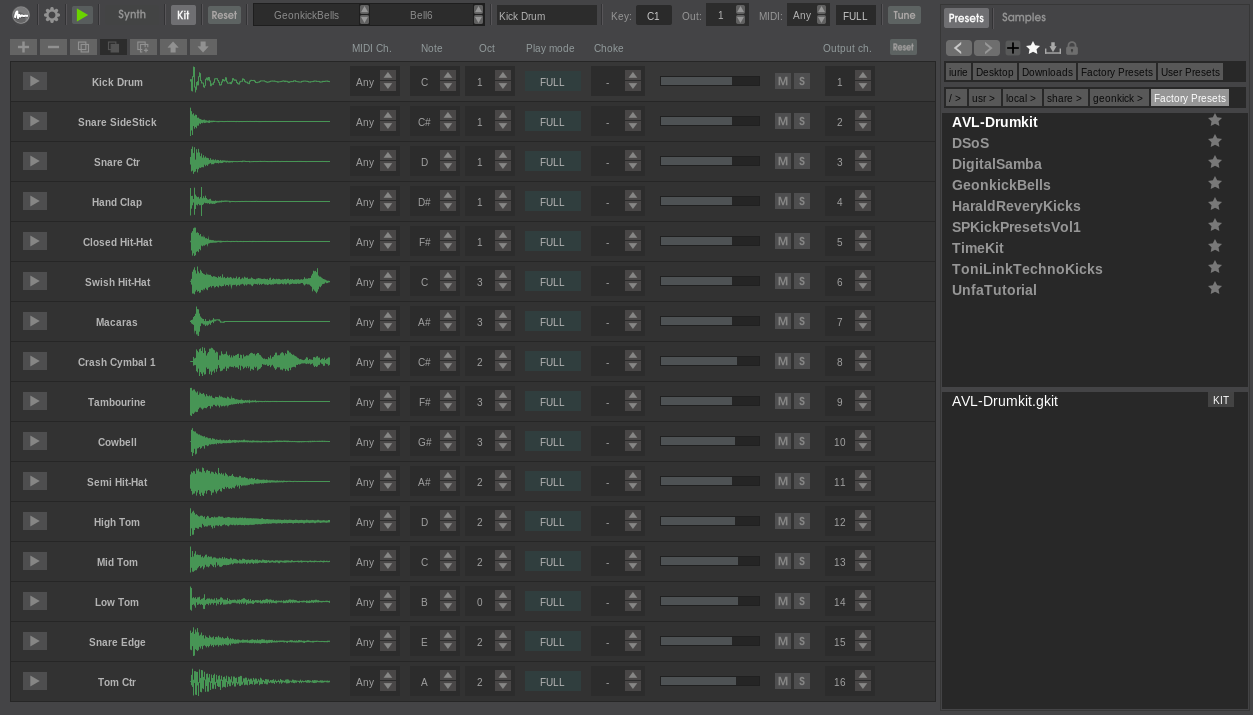
Now the instruments suppot three playback modes:
Support for instrument choke groups has been added. This allows instruments to stop or cut each other during playback when they are assigned to the same choke group.
The context menu of the envelopes that control frequency or cutoff now also supports entering notes, such as "C" or "A#".
This restores the previous functionality. Instrument presets can now be loaded directly into the Kit. A lock/unlock control in the preset browser has been added, and this will preserve the current instrument key, output channel, choke group, and MIDI channel when loading an instrument preset.
Kit presets have badge as "KIT" in the preset browser in otrde to be able to distigui them easler form the isntrument presets.
The layers mixer now has new UI and handles both layer enabling and selection of the current layer.
The Top Bar has been updated, including replacing the Controls tab with the Synth tab and adding more instrument controls related to playback.
Thanks to Toni Link, amazing new presets related to techno kicks have been added. The preset are published under CC-BY 4.0.
Support for both instrument presets and Kit presets has been restored, using the .gkick for instruments and .gkit for kits.
GUI Performance, DSP fixes, and other fixes and improvements has beedn done aloing the velope of the veriosn 3.9.0.